

Download Google Maps Space – Free 3‑D Space Exploration Tool
Overview
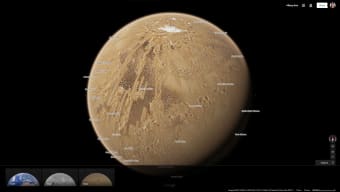
Google Maps Space extends the familiar Google Maps interface into the final frontier. By leveraging publicly available satellite imagery and NASA‑provided photographs, this free web‑based extension offers a quasi‑3‑D view of the planets, moons, and even the International Space Station (ISS). Users can rotate, zoom, and pan across celestial bodies, examining craters, valleys, and notable landmarks that are labeled with concise informational blurbs.
While the data set is limited to the solar system and a handful of deep‑space objects—reflecting the scarcity of high‑resolution interplanetary imagery—the experience is surprisingly immersive for a browser‑based tool. The interface mirrors Google Maps’ familiar click‑and‑drag navigation, yet adds space‑specific controls such as orbital path overlays and surface‑feature tags. In addition to visual exploration, Google Maps Space supplies contextual notes about each landmark, making it a handy educational companion for students, teachers, and space enthusiasts alike.
Because the platform runs entirely online, there is no need for a heavyweight installation; a modern browser on Windows, macOS, Linux, Android, or iOS can render the planetary panoramas smoothly. Whether you want to hover over the Olympus Mons on Mars, trace the icy ridges of Europa, or take a virtual stroll through the ISS modules, Google Maps Space provides a secure, free, and instantly accessible way to look around the cosmos—without ever leaving your desk.
Key Features & Interactive Experience
- Quasi‑3‑D planetary views with smooth rotation and zoom controls.
- Detailed surface labeling: craters, volcanoes, seas, and notable landforms are identified by name.
- Interactive ISS tour: explore modules, view real‑time position, and read explanatory notes.
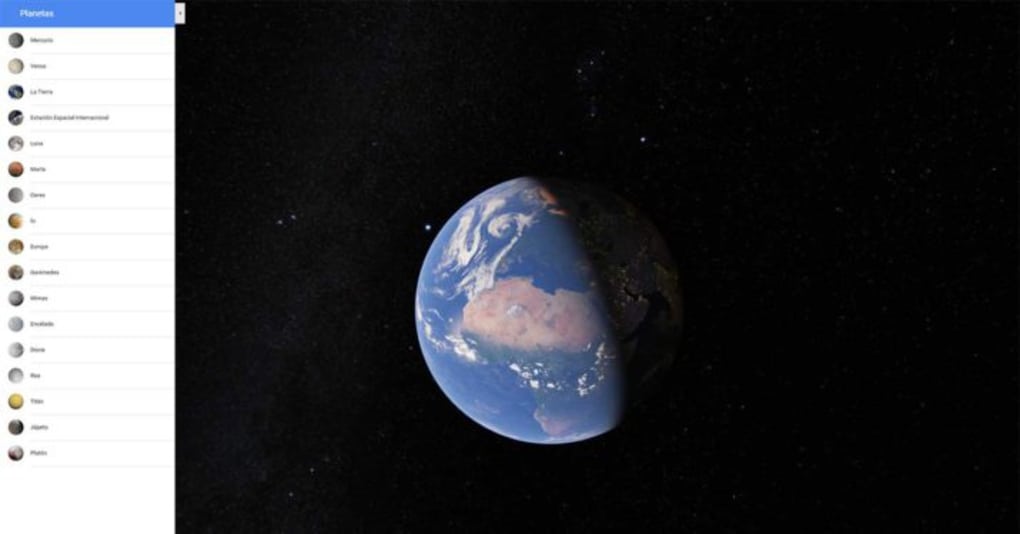
- Solar system navigation panel: jump instantly between planets and their major moons.
- Responsive design: works on desktop browsers and mobile devices alike.
- Free and secure: no registration required, and all data is served over HTTPS.
- Regular updates: integrates new NASA imagery as it becomes publicly available.
- Search functionality: type a celestial body or landmark to jump directly to it.
The core of Google Maps Space’s appeal lies in its blend of simplicity and scientific accuracy. While the rendering engine does not achieve true photorealism—due to the limited resolution of publicly released space photos—it still manages to convey the texture of lunar maria, the dust‑laden dunes of Titan, and the stark shadows of Martian cliffs. The tool’s overlay system highlights orbital paths, allowing users to visualize the relative motion of moons around their parent planets.
Moreover, the ISS interior tour uses a series of linked 360° images; clicking on a module door transports the viewer to the next compartment, mimicking a real‑world walk‑through. For educators, the built‑in informational pop‑ups provide bite‑sized facts that can be incorporated into lesson plans without the need for external research. Finally, the “Explore Nearby” feature suggests nearby landmarks based on the current view, encouraging users to discover hidden gems they might otherwise overlook.
Installation, Usage & Compatibility
Google Maps Space is a web‑based application, which means there is no traditional installation process. To start exploring, simply navigate to the official Google Maps Space URL using a modern browser (Chrome, Firefox, Edge, Safari). The platform automatically detects your operating system and loads the appropriate WebGL‑optimized assets. For users on mobile devices, a lightweight progressive web app (PWA) version is available; tapping “Add to Home Screen” creates an icon that launches the tool in a full‑screen window, providing a near‑native experience.
Supported platforms: Windows 10/11, macOS 10.15 or later, Linux distributions with recent graphics drivers, Android 8.0 or later, and iOS 13 or later. Because the application runs entirely in the browser, hardware requirements are modest: a GPU that supports WebGL 2.0 and at least 4 GB of RAM ensure smooth navigation even when zooming into high‑detail regions.
Getting started: Once the page loads, you’ll see a star‑filled sky background with a navigation toolbar at the top. Use the mouse wheel (or pinch gesture on touch devices) to zoom, click‑and‑drag to rotate, and click on any labeled landmark to open its information panel. The search bar at the upper‑right corner accepts planetary names, moon names, or specific features (e.g., “Valles Marineris”). To explore the ISS, select the “International Space Station” option from the planet selector, then click on highlighted modules to move through the interior. All controls are accompanied by tooltips for first‑time users.
Security & privacy: The service runs over HTTPS, and no personal data is collected unless you voluntarily sign in with a Google account to sync bookmarks. Because it is a read‑only viewer, there are no background processes or invasive permissions. Updates are delivered server‑side; users automatically receive the latest imagery and UI improvements each time they load the page.
Pros, Cons, Frequently Asked Questions & Final Thoughts
Pros
- Free and instantly accessible—no download required.
- Intuitive Google‑Maps‑style navigation reduces the learning curve.
- Rich educational content with labeled landmarks and descriptive blurbs.
- Cross‑platform compatibility ensures anyone with a modern browser can use it.
- Regularly updated with new NASA imagery as it becomes publicly available.
Cons
- Limited to solar‑system bodies; deep‑space objects are sparse.
- Image resolution varies; some moons appear low‑detail compared to planets.
- ISS interior navigation can feel clunky, requiring multiple clicks to move between modules.
- No offline mode—an internet connection is mandatory.
- Advanced 3‑D rendering options (e.g., lighting, texture adjustments) are absent.
FAQ
Is Google Maps Space really free?
Yes, the tool is completely free. Google does not charge for access to the planetary views or the ISS tour. All features are available without a subscription.
Do I need a Google account to use the service?
No. You can explore all planetary data without signing in. A Google account is only needed if you wish to save bookmarks or sync preferences across devices.
What browsers are supported?
Google Maps Space works on any modern browser that supports WebGL 2.0, including Chrome, Firefox, Edge, and Safari. Mobile browsers on Android and iOS are also fully supported.
Can I view high‑resolution images of distant moons?
The resolution depends on publicly released data. For many outer‑planet moons, only lower‑resolution shots are available, so the detail may be limited compared to inner planets.
Is there an offline version of Google Maps Space?
Currently no. Because the imagery is streamed from Google’s servers, an active internet connection is required to load planetary textures and the ISS interior photos.
Conclusion & Call to Action
Google Maps Space proves that a high‑quality space‑exploration experience doesn’t need a dedicated desktop application or a pricey VR headset. By marrying Google’s familiar map navigation with NASA’s publicly available planetary imagery, the tool offers a secure, free, and instantly accessible window into our solar system. While the coverage is limited to the bodies for which high‑resolution photos exist, the educational value—complete with labeled landmarks and concise descriptions—makes it an excellent supplement for classrooms, hobbyists, and anyone curious about the cosmos.
The occasional interface quirks, such as the click‑through ISS tour, are minor trade‑offs for a platform that runs in any browser without installation. If you’re looking for a quick way to satisfy your inner astronaut, simply visit the Google Maps Space website, start rotating Mars, or hop aboard the ISS, and let the universe unfold at your fingertips. Download Google Maps Space now and start exploring the final frontier—free, secure, and right from your browser.
Google Maps Space delivers an impressive, free, and browser‑based planetary viewer. Its strengths lie in the intuitive navigation and educational labeling, while the limited image resolution for distant moons and the clunky ISS tour prevent it from achieving a perfect score. Overall, it’s a valuable tool for anyone wanting a quick, secure way to explore the solar system online.



.png)



